Solfeggio
not required.
A plugin that builds a song demo in a minute: chords, bass, drums and a melody in 62 styles. Every note you play on your MIDI keyboard stays in key.
Press play. Sound on.
The plugin's own engine and sounds. In your DAW you record it as MIDI and play it with any instrument. Open the full demo →

Tap the dots to look around the plugin
From an empty project to a demo in a minute
Pick a mood
415 ready progressions of 2 to 16 chords: 21 moods and 19 genres, from sad and epic to K-pop and synthwave. Or build your own from the palette.
Choose a style
62 rhythm patterns for chords and bass: pop, rock, swing, Latin, house. 36 bass patterns and a drummer that follows the style.
Play
Every key lands in the scale and on the current chord. Press record in your DAW and the chords, bass and melody go straight to a track.
Видеоурок: как сделать демо песни в Solfeggio Killer
Inside the plugin
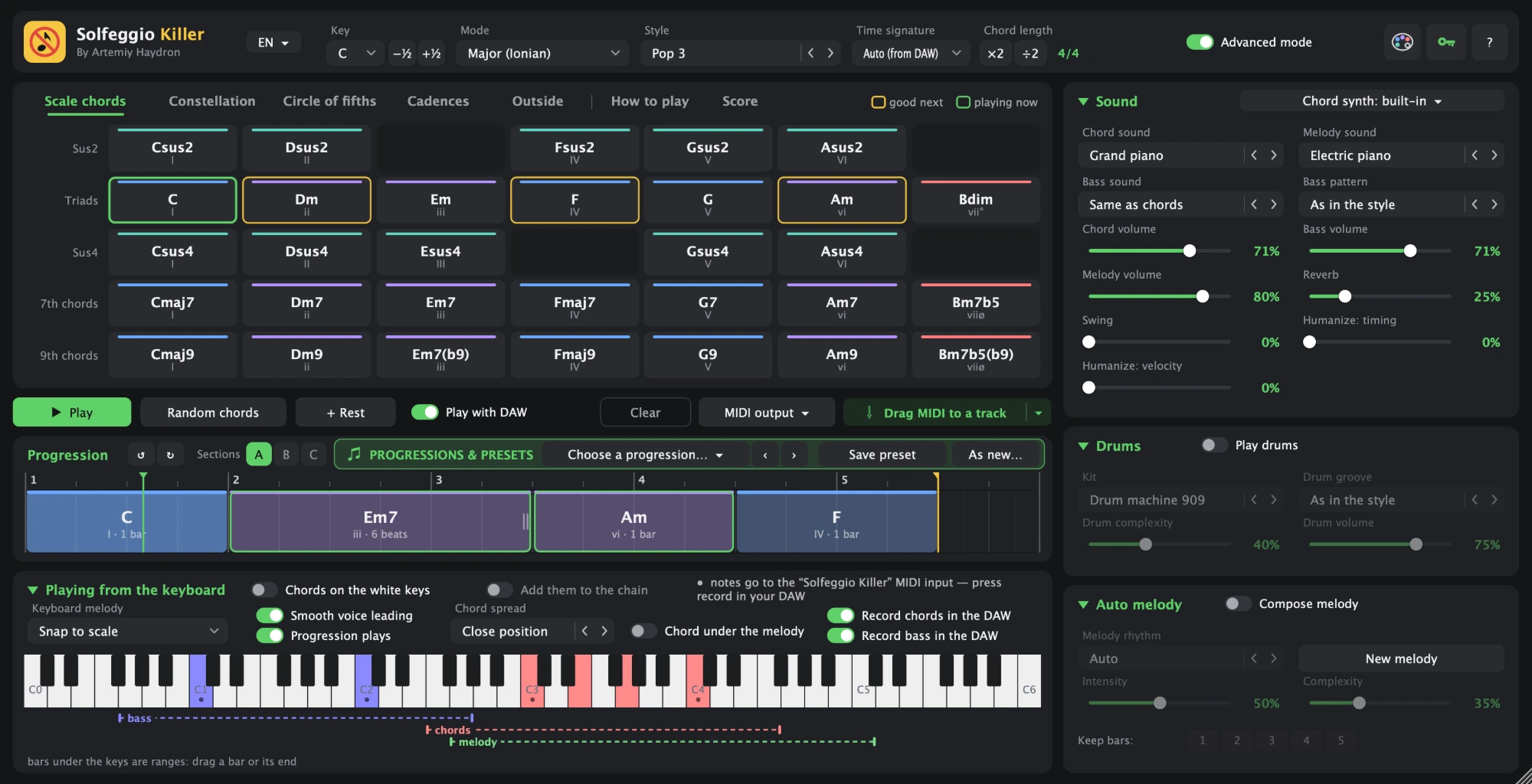
Every tab of the plugin, exactly as it looks.
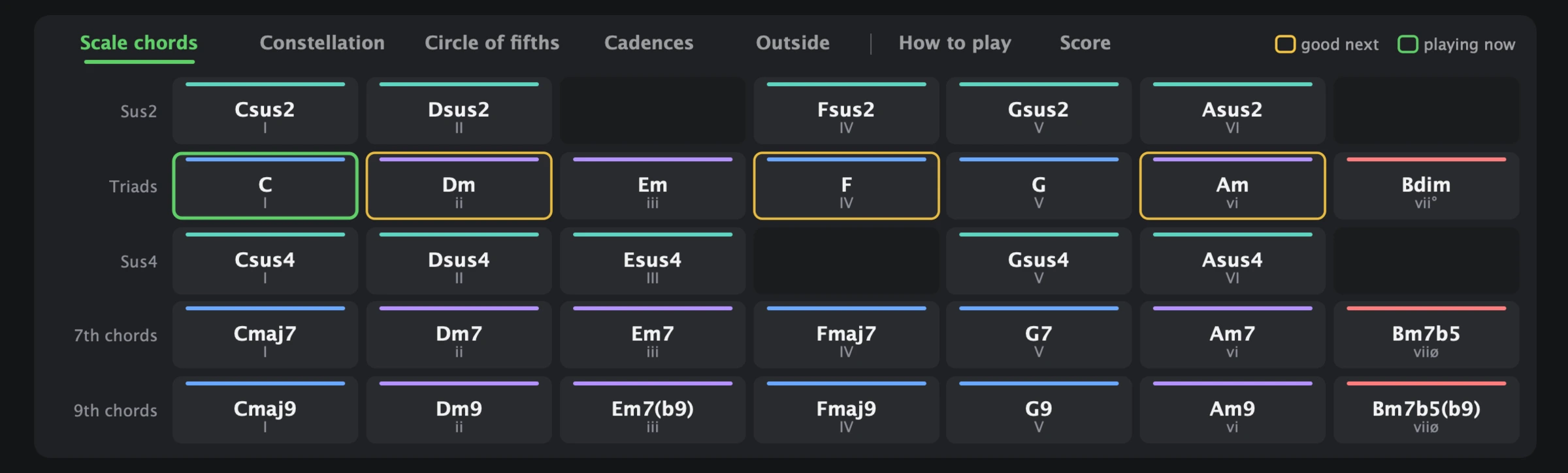
Scale chordsEvery chord of your key in five types. Click to listen, double-click to add. A yellow frame marks a good next chord.
One window instead of a stack of plugins
What it does, what it doesn't, and who it's not for.
Chords, bass, drums and melody together
One plugin plays the whole band. No routing between separate chord, bass and drum plugins.
Every key lands in key
Play your MIDI keyboard or the computer keys: each note moves into the scale and onto the current chord.
Chords from any audio
Drop a loop, a song or a region from your DAW: it finds the key, the tempo and the chords bar by bar.
macOS, Windows and Linux
AU, VST3, CLAP and a standalone app. One license for 3 computers on any of them.
One payment
No subscription. The key comes by e-mail and works offline after one activation.
What it does not do
- It does not write the song for you. The melody, the words and the choices stay yours: it plays the band so you can try ideas fast.
- It is not a sound library for a finished mix. The built-in sounds are for sketching: record the MIDI and play it with your own instruments.
Theory works for you
Everything people spend years learning is built in. Use it right away, and dig deeper when you feel like it.
Chords from audio and MIDI
Drop a sample, a loop, a song or a MIDI file on the window, or drag a region straight from your DAW: the plugin finds the chords.
- Drag a region from Logic, a clip from Ableton or an item from Reaper
- Finds the key, the mode and the tempo
- Chords bar by bar, with the seventh when it is heard
- The song's loop of 4–8 chords; verse, chorus and bridge into the sections A, B, C
- MIDI files too: the tempo from the file, the chords from the notes, 11th and 13th chords included
- Reads Splice-style file names (“…_126_F#m”)
- Or listens to a DAW track through the sidechain
Your own style
Draw your own chord and bass rhythm.
- A grid of sixteenths, 1 or 2 bars
- A row for each note of the chord: arpeggios and broken figures
- Bass: root, fifth, octave
- Hold beats over as in house, save the style under User
Auto melody
The plugin writes a melody over your progression and plays it with the chords.
- Chord tones on strong beats, passing notes between them
- Intensity from long notes to a stream of 16ths
- Keep the bars you like, rewrite the rest
- Six melody rhythms: even, syncopated, triplets, dotted and more
Chords beyond the textbook
Seven tabs of harmony. Hear every chord before you add it.
- Scale chords: 7 degrees in 5 types, also on the white keys
- Constellation: chords around the tonic by genre and mood, safe in the middle, bold on the edge
- Circle of fifths and 20 ready cadences
- Secondary dominants, borrowed chords, Neapolitan and tritone subs
- “Modulate to…”: ways into any key to hear first, tonicizations, a last-chorus lift
Drums
A drummer that plays along with your progression.
- Acoustic and lo-fi kits, 808 and 909 machines, Pop, Hip-Hop and IDM kits
- Grooves from pop and boom bap to baile funk, dubstep and IDM
- Ghost notes, percussion, a crash at the top of every loop and a fill at the end
Notation and chord boxes
See exactly what you wrote.
- A piano roll with every note and chord named
- Guitar and ukulele chord boxes all over the neck, the bass part on a bass neck
- A real grand staff in the rhythm of your style
- Save as PNG, PDF or MIDI for MuseScore, Sibelius and Finale
Straight into your DAW
Everything you play ends up in your project.
- Record chords, bass and melody to a track
- Drag the MIDI of a loop onto any track
- Serum, Vital or any AU/VST3 synth plays the chords right inside the plugin
- A separate MIDI FX plugin for Logic Pro
No DAW needed
The standalone app does it all on its own.
- Records 24-bit WAV and MIDI at once
- Separate dry tracks for chords, bass, melody and drums
- Presets shared with the plugin
- Your computer keyboard works as a piano
What musicians say
I gave it a long loop and it got every chord right. I've tried similar plugins, and this one is far easier to use. In the website demo I liked how it hints which notes to play over the harmony.
It feels like several chord and melody plugins rolled into one. A serious music-theory tool. An hour later I had an almost finished track, with my own bass, chords and melody. I can drop four plugins now.
I bought it before the video was even over. It's basically an interactive theory cheat sheet: you see everything and hear it right away. I studied theory long ago without much enthusiasm, and here it's all at hand.
There's hardly anything to nitpick. I like that the chords stay in the key I pick, and there are ready-made styles. You flip through combinations by mood and build your own song from them. A couple of years ago, when I was figuring all this out on my own, it would have helped a lot.
I finished music school and college long ago, and most of my solfeggio had faded. This plugin brought a lot of it back. Thanks for the tool!
I haven't come across anything easier among similar apps. I've already shown it to friends, and they love it too.

Made by one person who writes music too
I'm Artemiy Haydron, a sound designer and composer from Moscow. I built Solfeggio Killer because I needed it myself, and every update comes from what musicians write to me. I answer every e-mail myself.
One payment. Every system.
- AU, VST3, CLAP and the app for macOS 11+ (Apple Silicon and Intel)
- VST3, CLAP and the app for Windows 10/11 and Linux
- Solfeggio Killer MIDI for Logic Pro
- One license for 3 computers
- Interface and manual in 8 languages
- 10 days free to try, the key by e-mail right after payment

- The license key comes by e-mail within a minute after payment.
- Refund within 14 days of payment if the key has not been activated
- Not sure yet? Try it free for 10 days
Pay in US dollars with Visa, Mastercard or PayPal (via lava.top).
By paying you accept the terms of sale.
Try it free for 10 days
Everything works without limits: no key, no card. When you decide to keep it, buy a key and enter it in the plugin.
On your phone? The plugin runs on a computer. Send yourself the link and download it there.
Version 1.3.2 · macOS or Windows may ask once to allow the installer: how, see the questions below. · What's new
Built-in sounds
33 sampled instruments, many with several velocity layers, plus 17 vintage synths. A separate sound for chords, melody and bass.
Tap a sound to hear it.
Try every sound in the browser demo →12 skins and your own colours
The palette button in the header opens the skin window with a preview of each look and the window size. The layout, the logo and your projects stay the same. Or pick six colours yourself in the “Custom” skin.
Questions
For songwriters, producers, beatmakers and anyone who needs a demo fast: sketch the harmony, bass, drums and melody of a song in a few minutes, then take it into your DAW as MIDI or audio.
No. Pick a key, a mood and a style, and the plugin does the rest. If you want to learn, the Result and Score tabs show exactly what is playing.
Download the installer for your system from this page and try everything for 10 days. After payment the license key comes by e-mail within a minute: open the plugin, press the key button at the top and paste it.
The plugin asks for a key and goes silent. Your projects and settings stay as they are, and everything plays again once you enter a key.
Three. The AU, VST3, MIDI FX and the app on one computer count as one. To move to a new computer, press Release this computer in the plugin, or free a place in your account on this site.
Only once, to activate the key. After that the plugin works offline. For a studio computer that is never online there is activation with a license file (Offline activation, at the bottom of the page).
Dollars for cards issued outside Russia. Rubles for cards from Russian banks.
Check the spam folder. You can have the key sent again from your account page, or write to solfeggiokiller@yandex.com.
Click Done, open System Settings, go to Privacy & Security and click Open Anyway at the bottom. You only do this once. On Windows: More info, then Run anyway.
Logic Pro and GarageBand load the AU. Ableton Live, Cubase, FL Studio, Reaper, Bitwig, Studio One and Ardour load the VST3; Bitwig, Reaper, FL Studio and Studio One also load the CLAP. Without a DAW, use the standalone app. It needs about 120 MB of disk space.
No more than a drummer at a rehearsal. The plugin plays the band and shows what it plays and why (the Result and Score tabs). The song, the melody and the choices are yours.
Yes, within 14 days of payment if the key has not been activated on any computer: write to solfeggiokiller@yandex.com. And you can try everything free for 10 days before you pay.